


RainAware
3.588.00 Reviews
App Specs
- Version
- 2.1.7
- Updated On
- License
- $4.99
- Downloads
- 10,000+
- Developer
- RainAware
- Categories
- Weather
- Platform
- Android
Screenshots
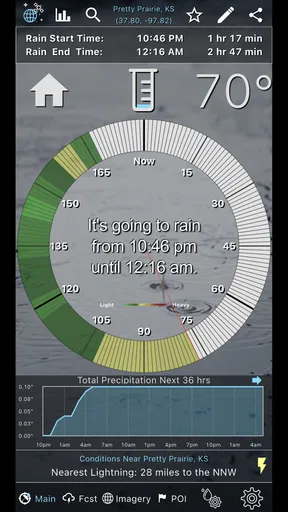
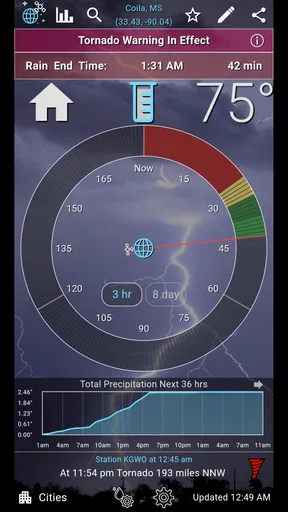
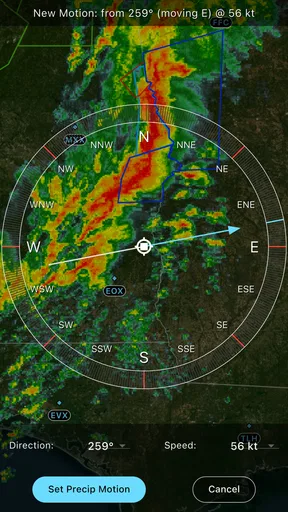
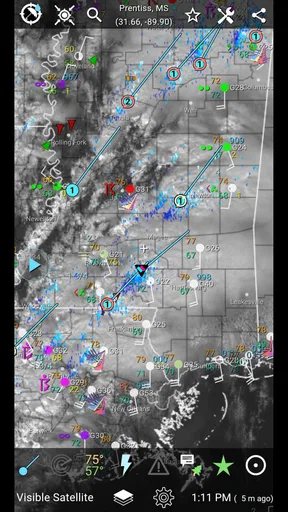
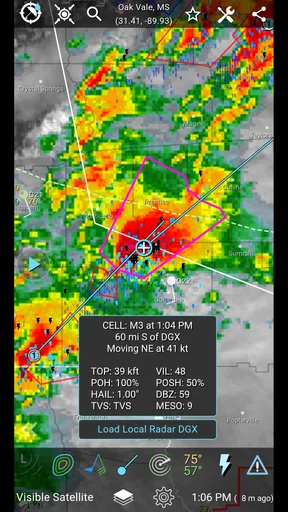
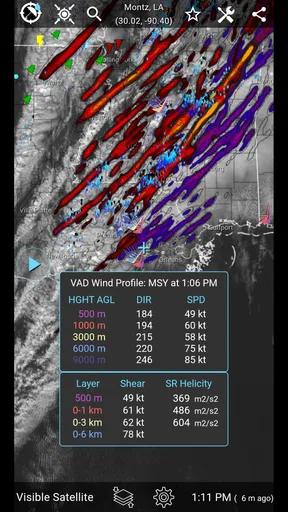
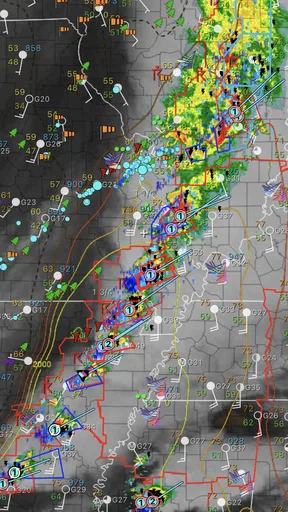
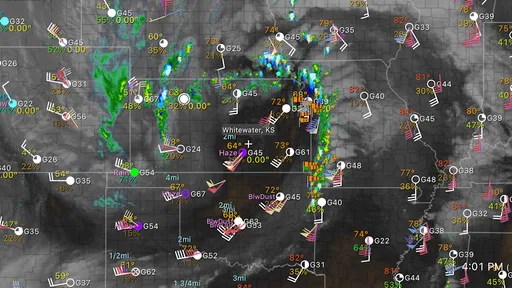
 Analysis by AppCompare
RainAware is the kind of weather app I open when “rain later” is not a useful enough answer. Instead of treating precipitation as a broad forecast-box problem, it focuses on the timing of rain around my current area, with radar, satellite imagery, lightning information, and storm alerts gathered into one weather-focused tool. That narrow purpose makes it more interesting than a standard forecast app, but it also means its value depends heavily on whether you need precise short-term decisions rather than a complete picture of the week ahead.
After spending time with it, I see the app as a practical companion for commuting, walking, outdoor work, travel between nearby places, and any plan where leaving ten minutes earlier can make a real difference. It is developed by RainAware and sits in the weather category. The app costs $4.99, carries an Everyone age rating, and has reached over 10K installs. Its average rating is 3.5 from around 154 ratings, which feels consistent with my impression: the central idea is useful, but the experience is more specialized and less universally polished than the familiar free weather apps many people already have.
How clearly the app presents fast weather decisions
When I judge a weather app for quick decisions, I look for more than a busy map: I want to know what information helps me choose whether to leave, wait, or change plans. This section considers how RainAware’s focused presentation supports those choices, and where visual weather details may call for a slower, more deliberate check.
A focused screen is more useful than a crowded forecast
The strongest part of RainAware is its focus. When I want to know whether I can walk to a nearby shop, take the dog out, or start a short outdoor task, I do not necessarily need a ten-day forecast filled with icons. I need to know what is approaching, how soon it may arrive, and whether the situation looks like ordinary rain or something more serious. RainAware is built around that immediate question, so its radar and storm-oriented tools feel more relevant than a long forecast in those moments.
This focus can also make navigation easier for someone who finds large weather dashboards overwhelming. There are fewer competing ideas to interpret than in apps that combine pollen, air quality, lifestyle scores, hourly charts, news cards, and advertising panels. I can approach it with a simple routine: check the immediate weather view, inspect the radar or satellite picture when the situation is unclear, and look for lightning or storm information before making an outdoor decision.
That does not mean every user will find it effortless. Radar imagery is inherently visual, and weather maps can require more interpretation than a sentence such as “rain expected soon.” A person unfamiliar with moving weather patterns may need a little practice before the display becomes genuinely helpful. My advice is to use the app during ordinary weather first, when there is time to compare what the map suggests with what is happening outside. That creates a personal reference point before relying on it for a rushed decision.
Readability depends on how much detail you want
For quick checks, the app’s specialized purpose is an advantage. I can concentrate on precipitation movement rather than scan a page of unrelated measurements. The visual approach is especially useful when I want to understand whether a shower is moving toward me or passing beside me, because a map can communicate direction and shape more naturally than a row of hourly symbols.
Worth Reading Before You Choose

Flipboard Shows What News Apps Must Do Beyond the Feed

Switching to Android Auto Means Rethinking Your Driving Routine

Google Calendar Makes a Crowded Week Easier to Manage

Ludo King Makes the Most of the Minutes Between Plans

Baby Panda World Brings Quick Play to Modern Phones, but Its Game Library Feels Busy

ESPN’s Live Game View Makes Following Close Games Easier
At the same time, visual weather information is not automatically readable for everyone. Small map details, changing colors, motion, and layered information can become tiring, particularly on a phone outdoors in bright light. I would not choose RainAware as my only source if I needed highly explicit text-based guidance. A conventional forecast app may be better for someone who prefers large written summaries, a simple hourly list, or a screen that can be understood without studying a map.
The best workflow I found was to use the map for confirmation rather than stare at it continuously. I first decide what I need to know, such as whether rain is likely during a short trip. Then I inspect the relevant area and stop once the answer is clear. This avoids turning a simple weather check into a prolonged visual task. It is a small habit, but it makes the app feel less demanding.
Useful information for people who plan around uncertainty
RainAware becomes more valuable when a forecast is changing quickly. A normal weather app may tell me that rain is possible during an hour, while a radar-centered view helps me think about the order of events: dry now, approaching rain next, and perhaps a clearer interval afterward. I still treat that information as guidance rather than a guarantee, but it supports better timing decisions.
One non-obvious strength is that the app can change how I plan short activities. Instead of cancelling a walk because rain is predicted sometime in the afternoon, I can check whether the weather pattern appears concentrated in one period and move the activity around it. That is more practical than reacting to a single rain icon. It is also a better fit for caregivers, outdoor staff, cyclists, delivery workers, and anyone who cannot simply ignore the weather until the next day.
Motor and sensory considerations in everyday use
RainAware does not require complicated data entry for its main purpose, which is helpful when I am checking conditions with one hand or while preparing to leave. The basic use case is a glance-and-decide interaction rather than a long form or detailed setup process. That suits a phone user who has limited time, limited hand control, or simply does not want to navigate several screens before seeing the weather situation.
However, the map-based design introduces its own demands. Pinching, dragging, selecting map areas, and interpreting changing visual layers can be less comfortable for people with reduced dexterity or hand tremors. Even when the information is valuable, a map may not be the easiest interface for a user who benefits from large controls and minimal gestures. In that situation, I would pair RainAware with a simpler weather source that presents the same decision as a clear text alert.
Sensory comfort is another consideration. Radar and storm displays can involve movement, color contrast, and rapidly changing visual information. Some users may enjoy that immediacy, while others may find animated weather maps distracting or fatiguing. I would use the app in short sessions and avoid relying on continuous visual monitoring. If alerts are enabled on the device, I would also review them carefully so that storm information remains useful rather than becoming a source of unnecessary interruption.
For people with low vision, the practical question is not only whether the map can be enlarged, but whether the meaning remains understandable after enlargement. A highly detailed weather image can become harder to interpret when only part of it fits on the screen. I would test the app in the actual conditions where it will be used, including outdoors, in poor light, and while wearing gloves if that is part of the routine. A product that looks clear at a desk may feel very different during a hurried commute.
Situational access: when the app earns its place
The clearest everyday scenario for me is a short trip on foot. Imagine I need to leave work, walk to a transit stop, and then wait outside. A general forecast may show rain during the afternoon, but that does not tell me whether leaving immediately is sensible or whether waiting a little would be better. In RainAware, I can inspect the nearby weather movement and make a more informed choice about clothing, route, or departure time. The app does not remove uncertainty, but it gives that uncertainty a more useful shape.
It also fits outdoor tasks that are easy to interrupt but annoying to restart. I might be washing a car, carrying groceries, taking photographs, or setting up a small outdoor activity. A radar view helps me decide whether to begin, pause, or finish a task before conditions worsen. The lightning and storm-oriented information adds another layer of caution when rain is not the only concern.
For travel, I find the app most useful during the final part of a journey rather than as a complete trip planner. Before leaving home, a broader forecast is still better for packing and scheduling. Once I am in a particular area, however, RainAware’s local emphasis can help with immediate choices. This distinction matters: it is a short-range decision tool, not the only weather resource I would use to plan a long trip.
The app may also suit people who have sensory or medical reasons to avoid being caught in sudden weather, provided they can comfortably interpret its presentation. A timely warning can make it easier to choose a sheltered route or delay an outing. But I would not treat any app alert as a substitute for personal safety judgment, especially during severe storms. The right response to dangerous conditions is to seek appropriate shelter and follow local emergency guidance.
Alerts are helpful only when they fit the person
Storm alerts sound valuable because they can reduce the need to keep checking the screen. For someone who is busy, driving as a passenger, working outdoors, or managing several tasks, an alert can bring attention to a changing situation at the right time. That is particularly useful for users who cannot comfortably study a radar map every few minutes.
There is a trade-off, though. Alerts can be stressful for people who are sensitive to sudden sounds, vibrations, or repeated interruptions. I would configure them around real decisions rather than enable every possible notification. A person who wants quiet, predictable phone behavior may prefer to open the app manually at chosen times. Someone who has difficulty remembering to check weather may benefit more from carefully selected alerts. The better choice depends on the user’s routine, not simply on how many warning options are available.
Another practical tip is to establish a backup habit. If an alert arrives while I am away from the phone, I do not want my entire safety decision to depend on one notification. I use RainAware as an additional signal alongside common sense, local conditions, and other trusted emergency information. That approach preserves the app’s usefulness without giving it more authority than a mobile weather tool should have.
Where the experience still creates barriers
The first barrier is cost. RainAware is priced at $4.99, and in-app purchases range from $0.99 to $69.99 per item. That makes the app a considered purchase rather than an automatic download for someone who only checks the weather occasionally. Since many phones already include a free weather service, RainAware must earn its place through its specialized timing and radar workflow. I think it can do that for frequent outdoor users, but casual users may reasonably decide that their existing option is enough.
The second barrier is that a specialized weather tool can feel incomplete if someone expects a full daily planning experience. RainAware’s identity is tied to immediate rain and storm awareness. If I want a broad view of upcoming days, lifestyle recommendations, or a simple text forecast that requires almost no interpretation, I may prefer a conventional weather app. Using both can be sensible, but it means RainAware is not necessarily a replacement for everything already on the phone.
The app’s average rating of 3.5 from around 154 ratings also suggests that the experience will not suit everyone equally. I would not read that number as a verdict on the idea itself. Rather, it reflects the tension between a focused radar product and the expectations people bring from mainstream weather apps. Users who want depth and immediate precipitation context may appreciate the focus, while users who want a polished, effortless forecast summary may find it less comfortable.
There is also a learning curve in interpreting weather imagery. A new user might see a colored area approaching and assume the result is certain, even though precipitation can change direction, weaken, split, or arrive earlier or later than expected. I recommend treating the display as a planning aid, not a promise. The more important the decision, the more useful it is to compare the app’s information with what is visible locally and with official warnings.
Compatibility and long-term practicality
The current version is 2.1.7, and the app requires operating system version 10 or later. That requirement is worth checking before purchase, especially if the app is intended for an older phone used by a family member or kept as a backup device. A weather app is only useful when it opens reliably on the device someone actually carries.
Because the app is paid, I would think about the intended routine before installing it. It makes the most sense for someone who repeatedly needs short-term rain timing: an outdoor worker, an active commuter, a parent coordinating outdoor plans, or a person whose comfort and safety depend on avoiding sudden weather changes. It is harder to justify for someone who only wants a quick temperature check or a broad forecast once in the morning.
The Everyone rating makes it suitable in terms of general audience classification, but age suitability is not the same as ease of use. A child, older adult, or person with access needs may still require help understanding radar colors, choosing alert settings, or deciding what an approaching storm means in practice. I would introduce the app with a simple routine and make sure the user knows where to look before leaving the device to them.
My inclusive verdict on RainAware
I recommend RainAware when the real question is, “Can I safely and comfortably do this soon, or should I wait?” Its strongest qualities are its narrow purpose, its attention to local rain timing, and the combination of visual weather context with lightning and storm awareness. Those features can make a meaningful difference for people who organize their day around short outdoor windows rather than broad weekly forecasts.
I would be more cautious about recommending it as the only weather app. The map-first approach can be demanding for users who need plain language, high readability, minimal gestures, or a low-stimulation interface. People who depend on predictable text summaries may find a simpler alternative more accessible, while users planning several days ahead may want a broader forecast tool alongside it. RainAware is best understood as a specialist instrument, not an all-purpose replacement.
My most useful advice is to test it against your actual routine: check it before a walk, compare its picture with the weather outside, try it in the lighting where you normally use your phone, and decide whether the visual information genuinely saves effort. If it helps you make faster, calmer choices, the purchase can be worthwhile. If the map creates more work than the rain itself, a straightforward forecast app is likely the better fit.
Overall, I see RainAware as a focused weather app with real value for timing-sensitive decisions, especially when rain or storms are the main concern. It supports different contexts reasonably well because it can be consulted quickly and used either manually or through alerts, but its visual presentation leaves important room for personal preference and ability. Its inclusive strength is practical focus; its main limitation is that the focus is delivered through weather maps that not everyone can interpret comfortably. For the right user, that is a fair trade-off. For everyone else, the familiar free forecast already on the phone may remain the more accessible choice.
Pros
- Provides precise rain timing and location-based forecasts.
- Interactive radar makes approaching showers easy to track.
- Useful notifications can help plan commutes and outdoor activities.
- Clean interface presents weather information without unnecessary clutter.
- Supports quick checks for nearby precipitation changes.
Cons
- Some advanced forecast features may require a paid subscription.
- Accuracy can vary when storms develop or change direction quickly.
- Requires location access for the most useful local predictions.
- Radar and map data may use considerable mobile data.
- Coverage and feature availability can differ by country or region.
FAQs for RainAware
What is RainAware, and how does it work?
RainAware is a weather app focused on giving you a more precise estimate of when rain may begin or end at your current location. After allowing location access, it uses local weather data and radar-based information to present a rain countdown and short-term forecast. This makes it especially useful for deciding whether to walk, commute, exercise outdoors, or delay an activity.
Does RainAware provide accurate rain predictions?
RainAware can be helpful for short-term precipitation planning, but its accuracy depends on the quality and availability of weather data in your area. Forecasts are generally most useful for the next few hours and may be less reliable during rapidly changing conditions, severe storms, or in regions with limited radar coverage. It should support, rather than replace, official weather warnings.
Does RainAware require location permission?
Location permission is important if you want RainAware to automatically provide forecasts for your current position. You may be able to search for or select another location manually, depending on the app version and platform settings. If you are concerned about privacy or battery usage, review the permission options and choose only the level of background access you are comfortable granting.
Is RainAware free to download and use?
RainAware may be available as a free download, although the exact features, advertising, subscriptions, or one-time purchase options can vary between Android and iOS and may change over time. Before installing, check the store listing for the current pricing information. Also review any in-app purchase details if you want access to additional forecast tools or a more complete experience.
Can RainAware replace a full weather app?
RainAware is designed primarily for answering a specific question: when rain is likely to arrive or stop. It can be an excellent companion for outdoor planning, but it may not offer the same depth as a full weather service, such as extended forecasts, detailed hourly conditions, air-quality information, maps, or comprehensive emergency alerts. For broader weather information, using it alongside a trusted weather app is advisable.


